Dream City: A Charming Display Font for Crafters and Small Shops
The afternoon light was soft through the window, and I had just finished pouring a fresh batch of lavender soy candles. The wax was cooling, but the labels still sat blank in my design software. I needed lettering that would feel as warm and inviting as the scent itself. That’s when I opened Dream City, and the whole label fell into place. This cute and friendly display font has a way of making any project feel elegant yet approachable, exactly what a handmade product needs to stand out in a crowded market.
Using Dream City for Candle Labels and Product Packaging
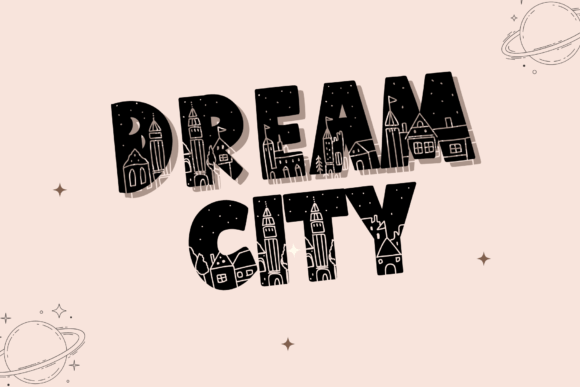
Dream City is a display font that brings a soft, friendly elegance to product packaging. For candle labels, I found that using it for the scent name—like “Lavender Vanilla” or “Cozy Cabin”—instantly lifts the perceived quality. The font’s delicate curves and slightly rounded terminals give it a handcrafted feel that pairs beautifully with a clean, minimalist label design. I like to keep the scent name in Dream City and use a simple sans serif for the smaller details like burn time and ingredients. The contrast makes the label easy to read while still feeling special. Whether you’re making bath bombs, soap wraps, or gift boxes, this display font adds that boutique touch without overwhelming the design.
Dream City in Greeting Cards and Wedding Invitations
Greeting cards are one of the sweetest uses for Dream City. The font’s friendly personality shines on birthday cards, thank you notes, and encouragement quotes. I tested it on a set of floral thank you cards for my shop, and the “Thank You” in Dream City became the focal point of the design. It’s not too formal, but it carries a sense of grace that makes the recipient feel truly appreciated. For wedding invitations, Dream City works beautifully for the couple’s names and the main event line. Because it’s a display font, it’s best for short, important phrases. I paired it with a light script font for the details and a simple serif for the body text. The result was a set of invites that felt both romantic and modern, without being overly fussy. If you’re designing wedding stationery, use Dream City for the headline and keep the supporting text clean to maintain readability.
Dream City for Printable Wall Art and Home Decor
Printable wall art is a huge category for crafters, and Dream City makes excellent quote art. I designed a set of farmhouse-style prints with the phrase “Bloom Where You Are Planted” in Dream City, and the font’s friendly curves gave the words a gentle, uplifting feel. For wall art, it’s important that the font looks good at larger sizes, and Dream City holds up well. The letterforms remain crisp and charming, even when scaled up to 11x14 inches. I also use it for seasonal signs like “Welcome Fall” or “Joy to the World” on wood slices or canvas. The font’s elegance adds a touch of sophistication to rustic home decor. If you’re creating digital downloads, make sure to include Dream City in the preview images so buyers can see the font’s personality before they purchase. It’s a great way to communicate the mood of your printable.
Dream City on Boutique Tags and Shop Branding
Branding a handmade shop is all about consistency, and Dream City can become a signature part of your visual identity. I use it for my boutique hang tags, product labels, and even my shop logo. The font’s cute and friendly demeanor fits perfectly with a small business that values a personal touch. When I designed my shop’s brand board, I chose Dream City as the primary display font for product names and taglines. For the logo, I paired it with a clean sans serif to keep the mark legible at small sizes, like on a business card or a social media icon. The key is to use Dream City sparingly—it’s a display font, so it works best for headlines and short phrases. On hang tags, I put the product name in Dream City and the care instructions in a simple serif. The combination feels intentional and polished. Customers often comment on the tags, saying they look like they came from a high-end boutique. That’s the power of a well-chosen font.
How Dream City Enhances Stickers, Tote Bags, and T-Shirts
Stickers are a fun, low-cost way to test a font’s appeal. I printed a small run of “Hello” and “Dream Big” stickers using Dream City, and they sold out quickly at a local market. The font’s friendly curves looked great on matte white vinyl, and the words were easy to read even at 2 inches wide. For tote bags, I heat-pressed a design with “Farmers Market” in Dream City, and the font’s elegance made the bag feel like a premium product. When using Dream City on t-shirts or apparel, be mindful of the font size. Because it’s a display font with delicate details, it works best for short phrases on the front of a shirt or a small logo on the sleeve. I recommend testing the design on a mockup first to ensure the letters are clean and readable. For cutting machines like Cricut or Silhouette, Dream City’s standard letterforms weed nicely, but always check the font’s preview for any tight spaces that might cause issues with small cuts. A simple weeding tool can handle most of the details, but if you’re working with tiny letters, consider scaling up slightly.
Pairing Dream City with Other Fonts for Consistent Branding
No font works in isolation, and Dream City pairs beautifully with a variety of other styles. For a romantic look, I combine it with a light script font like a delicate calligraphy style. For a modern, clean aesthetic, I use a simple sans serif like Montserrat or Lato. When I want a more traditional feel, I pair Dream City with a classic serif such as Cormorant Garamond. The key is to let Dream City be the star—it’s a display font, so it should carry the visual weight of the headline. The supporting font should be easy to read and not compete for attention. I also like to use Dream City for subheadings or decorative quotes within a design, with the body text in a neutral sans serif. This balance keeps the layout harmonious and professional. When creating a brand kit, test a few pairings with Dream City to see which combination best reflects your brand’s personality. Remember, consistency across products builds customer recognition, so choose one or two pairings and stick with them.
Commercial License and Practical Tips for Using Dream City in Physical Products
Before you start selling products with Dream City, check the font’s commercial license. Many premium fonts require a separate license for physical goods, digital downloads, or merchandise. Dream City is a display font, and its license typically covers personal use and small commercial projects, but always verify the terms with the foundry. If you’re planning to sell templates, printables, or SVG designs, make sure the license allows for embedding in editable files. Some font licenses restrict that, so it’s better to know upfront. Additionally, check if the font includes alternate characters, ligatures, or multilingual support. Dream City often includes a set of standard uppercase and lowercase letters, numbers, punctuation, and basic multilingual characters. For international customers, that’s a huge plus. I always download the font’s full character set before starting a project to see if it has the accents I need. When using Dream City in cutting machine software, remember that display fonts can have thin strokes that may not cut well at very small sizes. For stickers less than 1 inch, I recommend using a bolder weight or scaling the design up. Test a few cuts on scrap material before committing to the final product. Finally, keep a backup of the font file and never share it with others—each user should purchase their own license. By respecting the font’s terms, you support the designers who create these beautiful tools, and you ensure your projects are legally sound.
Dream City has become a staple in my craft room. Whether I’m designing candle labels, greeting cards, or shop tags, this cute and friendly display font adds exactly the right amount of elegance and class. It’s versatile enough for wedding invitations and printable wall art, yet approachable enough for stickers and tote bags. If you’re looking for a font that feels both elevated and welcoming, Dream City is a wonderful choice. Let it inspire your next product line, and watch your designs come to life with warmth and charm.